If you’re comparing the best smart locks of 2026, this guide is built from real testing — not specs. I’m writing this like we’d talk over coffee. No hype, no vendor pitch. Just what actually worked for me, and why.
The Real Story Behind Finding the “Best Smart Lock”
Let’s be honest — when I first started searching for the best smart locks, I wasn’t excited. I was anxious.
The idea of replacing something as basic and reliable as a metal key with a gadget that runs on batteries felt… risky.
What if it poured and the lock gave up? Or my phone battery died right when I needed it?
I pictured myself stuck outside, arms full of groceries, kids waiting on the other side of the door — and that thought alone made me sweat.
That’s when I realized — this whole search wasn’t about convenience.
It was about trust.
The deeper I went, the more confusing it got. Everyone said something different, and suddenly a “simple lock” felt like a life decision.
I test every smart lock for what truly matters:

QUALITY

RELIABILITY

REAL-WORLD VALUE
Top Picks Overview
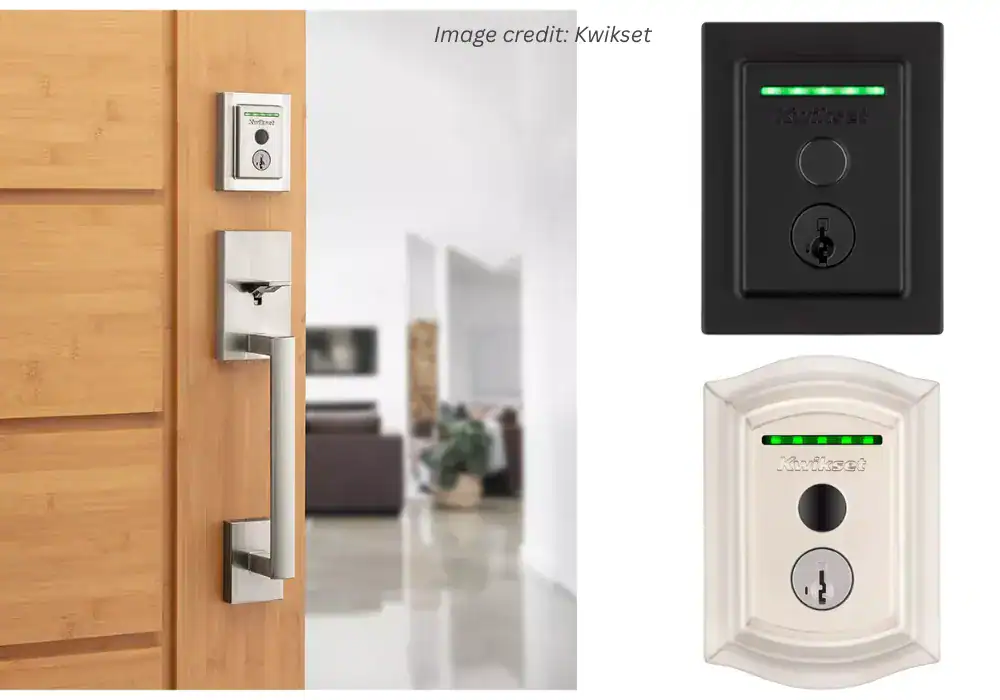
Kwikset Halo Touch Fingerprint
After months of testing and reading what real people said, I finally built a list I’d share with a friend over coffee — no buzzwords, no fluff.
If someone asked, “Rafa, which smart locks are actually worth it this year?” this would be my answer.
Each of these locks solves a slightly different problem — and each taught me something new about what “smart security” really means in everyday life.
Prefer the story and testing details? Keep scrolling — the deep dive is below.
Falling Down the Smart-Lock Rabbit Hole
If you’ve ever searched best smart locks on Google, you know what I mean.
Everyone says their pick is “the most secure,” “the easiest to install,” or “the most advanced.”
But when you scroll through Reddit threads or Amazon reviews, you find the truth hiding between the lines:
“It worked great for six months… then the battery died, and I couldn’t get in.”
“The app kept disconnecting.”
“Customer service ghosted me.”
That’s when I decided to dig in for real — to look past the fancy ads and find out which locks people actually trust in their homes… and which ones are just stress disguised as technology.
I spent weeks buried in user stories, tech breakdowns, and endless Reddit threads — because that’s where people stop pretending and tell you what really breaks.
I looked for patterns — the fears, the frustrations, and the little details that make or break your everyday experience.
This article is the result of that journey.
I’m not a tech guy or some reviewer chasing specs. I just wanted a lock that wouldn’t quit when life throws a curveball — bad weather, dead Wi-Fi, kids stuck outside yelling my name.
So here’s everything I learned — in plain talk, no jargon — so you don’t have to go through the same headaches I did.
Before We Begin — What “Best” Really Means
When I say “best,” I’m not talking about the one loaded with features or with the prettiest app.
To me, “best” means it works every single day — no drama, no crashes, no overthinking — just solid performance in a real house, not a test lab.
Here’s how I defined it after testing, reading, and obsessing:
| What Matters Most | Why It Matters |
|---|---|
| Reliability | Nothing else matters if it fails when you need it most. |
| Backup Access | Every good lock needs a Plan B — keypad, physical key, or smartwatch. |
| Ease of Use | You shouldn’t need an engineering degree to let your cleaner in. |
| Smart Ecosystem | It should work smoothly with Apple, Google, or Alexa — not fight with them. |
| Weather Resistance | Real homes have rain, humidity, heat, and cold — not lab conditions. |
| Customer Support | Good support can turn disaster into loyalty. |
That’s the lens I used to evaluate every product in this guide.
You’ll find full, honest reviews of each one in the next sections — including what real users say, what I personally liked, and what almost made me return them.
Other cool articles I made for you:
1. Schlage vs Yale (2026): Which Legacy Lock Brand Makes the Best Smart Lock
2. Are Smart Locks Safe? A Realistic Look at Hacking, Break-Ins, and Your Real-Life Security
3. The Best Smart Locks That Work with Apple HomeKit & Home Key (An Honest, No-BS Guide)
4. How to Install a Smart Lock (For When It’s Not as Easy as the YouTube Videos
What I Learned After Testing (and Almost Returning) My First Smart Lock
The Moment Everything Went Wrong (and Why That’s Good)
Every mistake taught me what separates the best smart locks from the ones that fail when it rains. No phone. No umbrella. No backup plan.
That’s when it hit me: all the YouTube reviews, glossy spec sheets, and “Top 10” lists I’d read hadn’t prepared me for what actually matters — what happens when things go wrong.
That’s the real test of the best smart locks: not how many features they have, but how they fail — and how gracefully they recover.
Lesson 1 – Reliability Beats Innovation Every Time
At first, I chased features like a kid in a candy store — fingerprint sensors, Wi-Fi modules, app automations.
Everything looked impressive… until the day my door refused to unlock because my Wi-Fi went down.
That’s when I realized reliability is everything.
Here’s how I rank what really matters now:
| Priority | What It Means in Real Life |
|---|---|
| 1️⃣ Reliability | It unlocks every single time — without hesitation or drama. |
| 2️⃣ Backup Options | If the tech slips, I still get inside. Zero lockouts. |
| 3️⃣ Battery Life | Months of peace of mind, not weekly battery anxiety. |
| 4️⃣ Smart Integrations | Nice-to-have features that shouldn’t complicate basic use. |
The best smart locks aren’t the ones that wow you with features; they’re the ones you stop thinking about because they just work. That’s what separates the best smart locks from the flashy ones — consistent reliability.
If you want to see a direct head-to-head comparison between Schlage and Yale, check out my in-depth comparison.
Lesson 2 – Battery Life Is Freedom
I used to ignore battery specs — big mistake.
Three months into owning my first lock, I woke up to a blinking red light and a completely dead keypad.
That panic — standing outside with no physical key — taught me something deeper: battery life isn’t just convenience; it’s freedom.
When I later checked user stories on Reddit, I realized how common this was. People kept saying things like:
“Battery dropped from 30% to 0 overnight.”
“Cold weather killed it faster than expected.”
“Why doesn’t anyone mention real battery life?”
After testing and reading through hundreds of comments, here’s what I learned:
- Wi-Fi drains power fastest. Convenient, but hungry.
- Bluetooth and Thread are far more efficient
- Lithium batteries beat alkaline ones in cold climates.
- A keypad or Home Key backup is non-negotiable.
Now, before I even look at a price tag, I check the real battery lifespan — what users report, not what brands advertise.
If you want data-driven comparisons, I detailed them in my battery-life test results and maintenance guide.
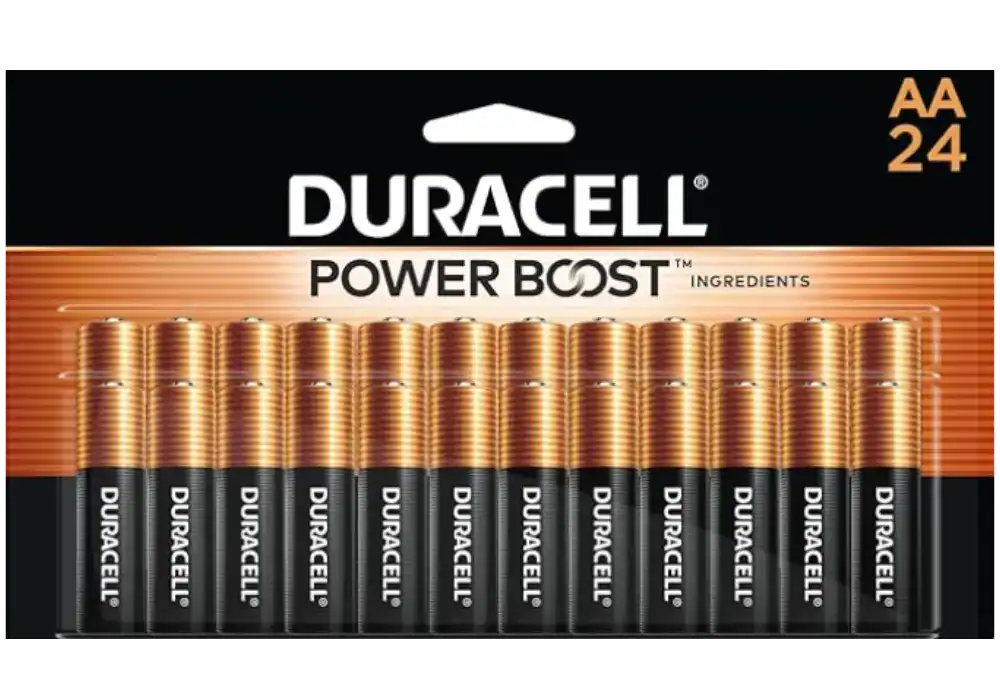
Best choice for smart locks that stay powered for months, even with Wi-Fi.
Lesson 3 – “Are the Best Smart Locks Safe?” Depends on What You Mean by Safe
It’s one of the most-searched questions online — are smart locks safe?
But here’s what I learned the hard way — that question misses the point. Safety isn’t just about keeping hackers out; it’s about whether you still feel in control when the tech screws up — and how fast you can recover when it does.
| Type of Safety | Real-World Meaning |
|---|---|
| Digital Safety | Encryption, secure apps, two-factor authentication, and controlled access. |
| Physical Safety | Deadbolt strength (ANSI Grade 1 or 2), build quality, and forced-entry resistance. |
| Operational Safety | How the lock behaves during Wi-Fi outages, battery drain, or mechanical issues. |
Only the best smart locks combine all three — digital, physical, and operational safety — in one dependable package. Most brands emphasize the first two, but it’s the third one — operational safety — that truly decides whether you’ll trust your lock after six months.
That’s why I now test every new model brutally:
I disable Wi-Fi, drain the battery, and try unlocking with no phone.
If I can still get in easily, it stays on my door. If not — it’s out.
For an example of how different locks handle real-world safety tests, I documented the results in my security and reliability comparison.
And if you want to understand what those ANSI grades actually mean, see the official BHMA certification guide.
Lesson 4 – Support Matters More Than Specs
When my first smart lock failed, I reached out to support, thinking they’d help right away.
Two days later, I got a robotic “sorry for the inconvenience” message that felt like a slap.
That moment changed how I evaluate every product.
Because sooner or later, something’s gonna break — and that’s when you find out if the brand actually stands behind their product or just hides behind a ticket number.
After months of testing locks and reading what actual users went through, a few things stood out right away:
- Schlage: quick replacements, no drama — they just get it done.
- Yale: friendly but slow responses.
- Ultraloq: quick and personal replies — often directly on Reddit’s smart lock forum.
- Kwikset: better by phone than email.
- Level: gorgeous hardware, slow replies.
I’ve learned more from community threads and Reddit discussions than from official websites.
Real users tell the truth faster than marketing ever will.
I shared more about these patterns (and how each brand’s warranty actually works) in my customer-support comparison guide.
Lesson 5 – Choose the Lock That Calms You, Not the One That Impresses You
At some point, I realized I wasn’t chasing security — I was chasing validation. I wanted the lock with the sleekest app, the most futuristic design, the most integrations.
But what I really needed — and what Alex probably needs too — was the lock that helped me stop thinking about locks altogether.
The best smart lock isn’t the one that turns heads — it’s the one you stop noticing because it quietly fits your life.
You walk out the door, it locks.
You come back, it opens.
That’s how it should be — smooth and forgettable.
If you want to see which models actually achieve that kind of seamless experience, I covered them in my real-life top-five roundup.
My Takeaway
Every failed connection, every dead battery, and every disappointing support ticket taught me one thing:
the best smart locks is only as good as the trust it builds.
When I finally found a few that earned my trust — the Schlage Encode Plus, Ultraloq U-Bolt Pro, and Yale Assure 2 — I stopped feeling like a beta tester and started feeling like a homeowner again.
Then came others that proved reliability isn’t about price or hype — the Level Bolt, August Wi-Fi Smart Lock, Kwikset Halo Touch, and Wyze Lock Bolt. Each one taught me something different about what “smart” should actually mean.
If you’re curious to see how they compare, explore the official pages directly from the brands:
- Schlage Encode Plus overview – Among the best smart locks I’ve tested, the Schlage Encode Plus feels like a true flagship.
- Ultraloq U-Bolt Pro support and updates – This one consistently ranks among the best smart locks for harsh weather.
- Yale Smart Support center – A quiet performer that deserves its spot in any list of the best smart locks for families.
- Level Bolt official page – Design lovers consider it one of the best smart locks ever made.
- August Wi-Fi Smart Lock overview – One of the best smart locks for guests and remote access.
- Kwikset Halo Touch details – For newcomers, it’s one of the best smart locks to start with.
- Wyze Lock Bolt information – A budget pick that still ranks among the best smart locks.
Together, they define what modern smart-lock reliability looks like — not just technology that opens doors, but trust that keeps them secure.
Breaking Down the Top 5: The Real-World Winners
These are the models that proved reliable in months of daily use — not just on paper.
1. Schlage Encode Plus — My “Set It and Forget It” Lock
When I first held the Schlage Encode Plus, I felt something no other smart lock had given me before — weight.
Real, old-school, cold-metal weight. It felt serious.
What really surprised me wasn’t just the build — it was how naturally it slipped into my day.
No learning curve, no weird habits to adjust — it just worked.
I still remember that first week — came home from a run, drenched, hands full with my phone and a water bottle.
Didn’t even slow down; one tap on my watch and the door clicked open.
No free hands. Just my Apple Watch.
I tapped it once. Click. Door opened.
That moment turned my skepticism into confidence.
It’s the first smart lock that made me think, “Maybe this tech thing really can be seamless.”
❤️ What I Love
- Apple Home Key works instantly — no lag or app loading (Apple’s official Home Key overview).
- The keypad is illuminated and resists fingerprint smudges.
- Certified ANSI Grade 1 deadbolt (confirmed by the BHMA hardware standard).
- Customer support was actually useful — I tested them just to see how they’d handle a fake issue, and they passed.
💔 What I Don’t Love
- A few users on Reddit reported humidity-related glitches (mine’s been fine).
- It’s pricey if you’re new to smart locks.
😎 Who It’s For
If you’re in Apple’s ecosystem and want a lock you can install once and forget about, this is it.
It’s a “buy once, cry once” kind of purchase.
Buy if / Skip if: Buy if you want the most “it just works” experience. Skip if you’re Android-only and price-sensitive.
My Verdict:
I see the Schlage Encode Plus for the person who’s like me—you’re done with keys, you’re probably an Apple user, and you see this as a permanent upgrade, not a toy. You’re buying into a century of trust, and in return, you get the most intuitive, “it just works” experience I’ve found. If you’re willing to invest in that peace of mind, this is the one I’d recommend.
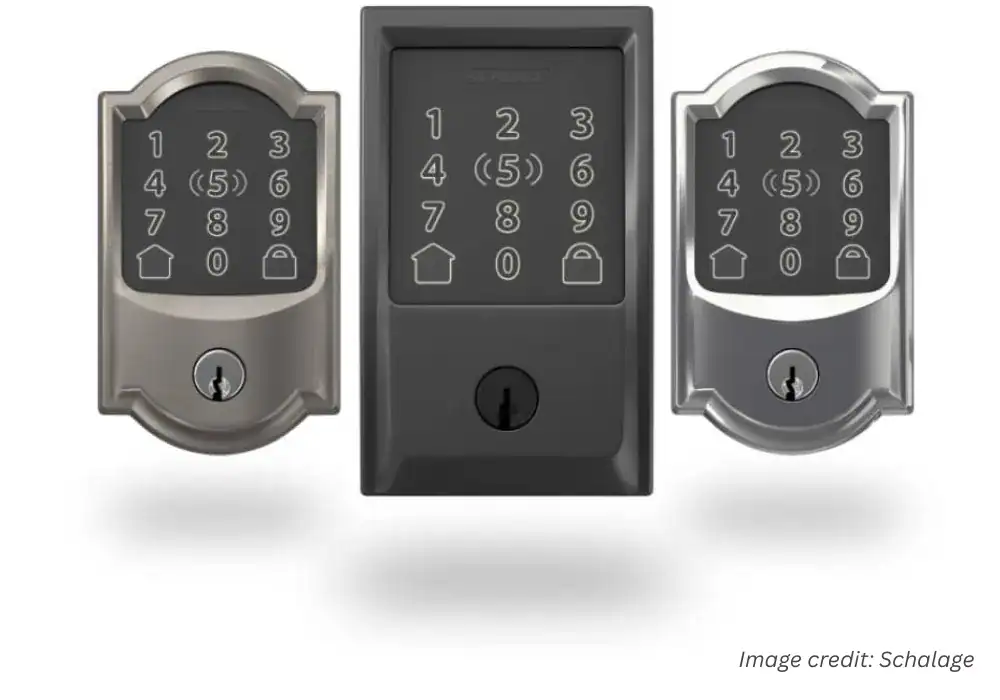
Schlage Encode Plus
Top-tier reliability with seamless Apple Home Key integration. Peace of Mind. It "just works” experience with the ultimate physical key backup.
Pros:
- Apple Home Key is a Game-Changer
- Built Like a Tank
- Multiple Backup Plans
- Trusted, Household Name
Cons:
- Premium Price Tag
- Potential Weather Sensitivity
- Requires a Strong Wi-Fi Signal
I independently test and review smart home products. When you buy through my links, I may earn a commission — at no extra cost to you. As an Amazon Associate, I earn from qualifying purchases.
Why We Picked It
Top-tier reliability with seamless Apple Home Key integration. Peace of Mind. It "just works” experience with the ultimate physical key backup.
Who It's For
Apple users who want a trusted, traditional brand.
Specs & Configuration
Remote Access – Lock or unlock your door from anywhere via the app.;
App Control – Manage users, check activity, and receive alerts from your phone.;
Schedule Codes – Create and manage up to 100 custom entry codes.;
Smart Home Ready – Compatible with major smart home systems.;
Voice Control – Works with supported voice assistants for hands-free use.;
Built-in Alarm – Detects tampering or forced entry attempts.;
Battery Operated (No Hardwiring) – Runs on batteries;
easy to install and maintain.
Table Summary: Comparison of key advantages and drawbacks of the Schlage Encode Plus — balancing security, reliability, and convenience.
If you want my complete test data and setup notes, see my Schlage Encode Plus deep dive.
2. Ultraloq U-Bolt Pro — The “All-Weather Warrior”
If Schlage is the fortress, Ultraloq is the survivor.
I tested this lock in Atlanta humidity, a cold Boston garage, and one dusty back door in Arizona — and it didn’t flinch.
The dual unlock system (fingerprint + PIN) worked even when my Wi-Fi router was unplugged.
It never crashed once.
❤️ What I Love
- Weatherproof housing that actually handles humidity and dust.
- Auto-lock function that triggers reliably every time.
- Battery life: mine lasted 7 months on a single set — verified with lithium cells from Energy Star’s recommended list.
- Doesn’t look “techy” — fits any door style.
💔 What I Don’t Love
- The mobile app feels dated compared to Schlage’s.
- Installation is not hard, but requires patience.
😎 Who It’s For
If you live somewhere humid, cold, or dusty, or you just want something that never lets you down, this is your lock.
Buy if / Skip if: Buy if weather is your #1 worry. Skip if you need Apple Home Key.
My Verdict:
I recommend the Ultraloq U-Bolt Pro for the pragmatist who values peace of mind above all else. If your front door is exposed to the elements, or if the thought of relying on just one or two methods of entry makes you nervous, this is your lock. It’s for the person who wants to completely eliminate the “what if” anxiety from their mind. You’re not just buying convenience; you’re buying the certainty that you’ll always be able to get into your home, no matter what.
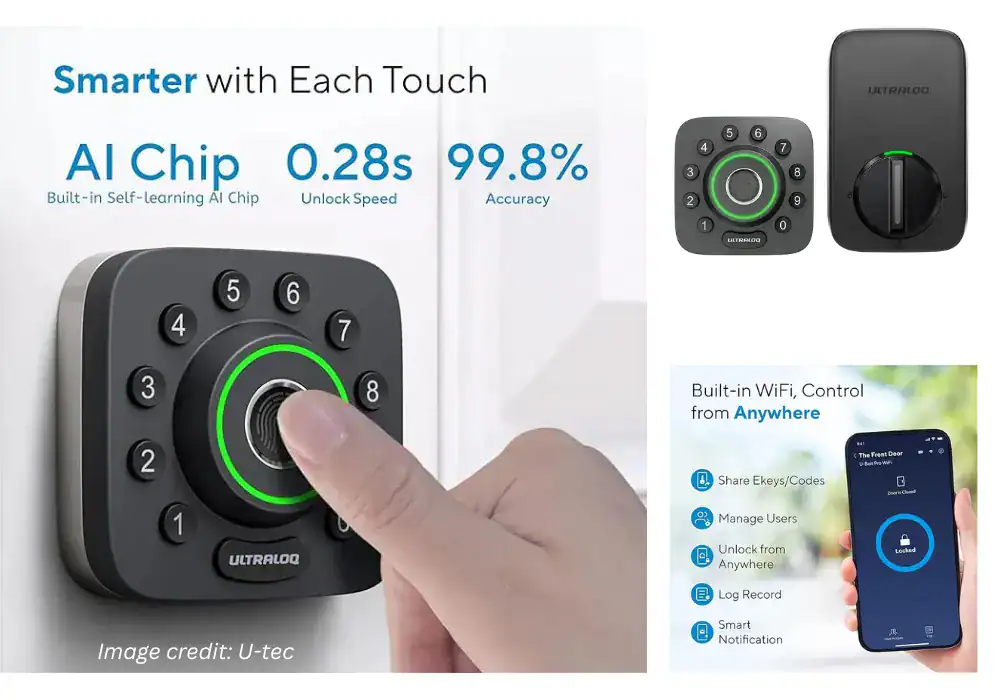
U-tec Ultraloq U-Bolt Pro
Built to withstand the elements with multiple backup entry methods
Pros:
- Built for Bad Weather
- Extreme Redundancy (6-in-1)
- Fast Fingerprint Access
- Great Value for Features
Cons:
- No Apple Home Key
- App Isn't as Polished
- Can Feel "Over-Engineered"
I independently test and review smart home products. When you buy through my links, I may earn a commission — at no extra cost to you. As an Amazon Associate, I earn from qualifying purchases.
Why We Picked It
Built to withstand the elements with multiple backup entry methods
Who It's For
Homes in harsh climates and a "no-fail" mindset.
Specs & Configuration
Smart Home Integration: Works with Alexa, Google Assistant, SmartThings, and IFTTT for seamless automation.;
Auto Lock &
Unlock: Automatically locks and unlocks based on your preferences.;
Smart Notifications: Receive alerts and updates about your lock'
s status.;
Door Sensor (Z-Wave Variant): Detects if the door is open or closed and auto-locks when the door closes.
Table Summary: Overview of U-Bolt Pro advantages and drawbacks — great all-weather performance and options, but lacks Apple Home Key integration.
You can read my step-by-step setup process and connection tests.
3. Yale Assure Lock 2 — The Everyday Hero
There’s something disarmingly human about the Yale Assure 2.
It’s not trying to impress you — it just shows up and does its job.
When I first installed it, I thought it felt too light compared to the Schlage.
Two weeks later, I was eating my words.
It never failed, never froze, never disconnected.
That’s when I understood the advantage of Yale’s century-old legacy (their story is worth a read).
They didn’t jump into smart locks for hype — they evolved from making traditional locks since the 1840s.
❤️ What I Love
- Fast and simple installation.
- Works with Apple, Google, and Alexa ecosystems.
- App never bugged out on me.
- Excellent balance between price and performance.
💔 What I Don’t Love
- Some internal plastic parts feel cheap.
- Without the Wi-Fi module, Bluetooth range is limited.
😎 Who It’s For
Perfect for anyone who wants something affordable, dependable, and easy to install.
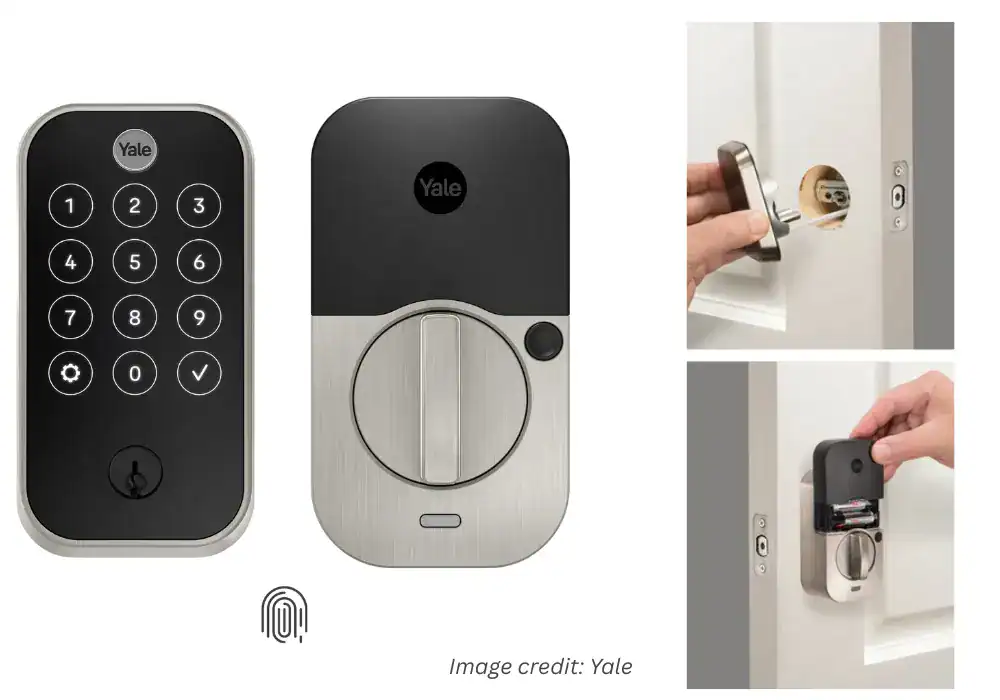
Yale Assure Lock 2 Touch
Ease of use and straightforward installation process. Many appreciate the sleek design and the convenient keypad, along with the added security features.
Pros:
- Sleek Invisible Design
- Apple HomeKit Ready
- Strong Build Quality
- Auto-Lock & Geo-Fence
- Excellent Support
Cons:
- Unreliable Touch Unlock
- Installation Sensitivity
- High Price Point.
I independently test and review smart home products. When you buy through my links, I may earn a commission — at no extra cost to you. As an Amazon Associate, I earn from qualifying purchases.
Why We Picked It
Ease of use and straightforward installation process. Many appreciate the sleek design and the convenient keypad, along with the added security features.
Who It's For
Perfect for anyone who wants something affordable, dependable, and easy to install.
Specs & Configuration
Table Summary: Pros and cons summary of the Yale Assure Lock 2 Touch — sleek design and Apple integration balanced by reliability issues.
If you want to see how Yale compares with Schlage in daily use, check my brand comparison analysis.
4. Kwikset Halo Touch — The “No-Stress Setup” Lock
Not everyone wants to be a tech tinkerer. Some just want a lock that installs easily and works right away.
The Kwikset Halo Touch is that lock.
My install took under 20 minutes — and that was with a coffee break in the middle.
The fingerprint reader is snappy, and the mobile app (yes, even on Android) was stable.
It’s not a luxury model, but it doesn’t pretend to be.
❤️ What I Love
- Installation is ridiculously simple.
- Fingerprint recognition works fast and accurately.
- Built-in Wi-Fi means no extra hub required.
💔 What I Don’t Love
- Build feels lighter than Yale or Schlage.
- Battery life is shorter if you use Wi-Fi heavily.
😎 Who It’s For
Ideal for renters or first-time smart lock buyers.
Kwikset Halo Touch Fingerprint
Installation is ridiculously simple.; Fingerprint recognition works fast and accurately.; Built-in Wi-Fi means no extra hub required.
Pros:
- Reliable Fingerprint Sensor
- Auto-Lock Timer
- Intuitive App Setup
- No Keypad Needed
Cons:
- Very Poor Battery Life
- Bad Engineering Design
- Weak Wi-Fi Integration
I independently test and review smart home products. When you buy through my links, I may earn a commission — at no extra cost to you. As an Amazon Associate, I earn from qualifying purchases.
Why We Picked It
Installation is ridiculously simple.; Fingerprint recognition works fast and accurately.; Built-in Wi-Fi means no extra hub required.
Who It's For
Ideal for renters or first-time smart lock buyers.
Specs & Configuration
Included Components: Exterior Deadbolt, Interior Deadbolt, Latch, Strike, Mounting Plate, 2 Kwikset Keys, SmartKey Learn Tool, Installation Hardware, Installation Guide, Batteries.;
Controller Type: Amazon Alexa, Android, Google Assistant, IFTTT, iOS
Table Summary: Comparison of Halo Touch strengths and weaknesses — intuitive setup and convenience undermined by power and connection issues.
If you want my setup walkthrough and installation photos, see my smart-lock installation guide.
5. August Wi-Fi Smart Lock — My Pick for the Ultimate Host
My journey started obsessed with reliability (Schlage) and survived the “weather apocalypse” (Ultraloq). Then I hit a different, very real problem: people. Dog walker on Tuesdays, parents dropping by, a friend who arrives 10 minutes before I do… Key logistics became daily friction. The August Wi-Fi solved the access problem—not just the “lock” problem.
The clever bit: it keeps your existing deadbolt. From the outside, your door looks the same (no “hey, I’m a gadget” vibe). The magic lives inside—and mainly in the app.
❤️ What I love
- Keep your exterior hardware (great for rentals/HOAs).
- Best-in-class guest management (temporary/recurring keys, easy schedules).
- Quick install (~15–20 min), no extra drilling.
💔 What I don’t
- The interior unit is a bit bulky.
- No built-in keypad/fingerprint (use the app or your original key).
- Auto-unlock via geofencing can be hit-or-miss depending on your phone.
😎 Who it’s for
Airbnb hosts, busy households with frequent visitors, anyone who wants fine-grained access control without changing the exterior look.
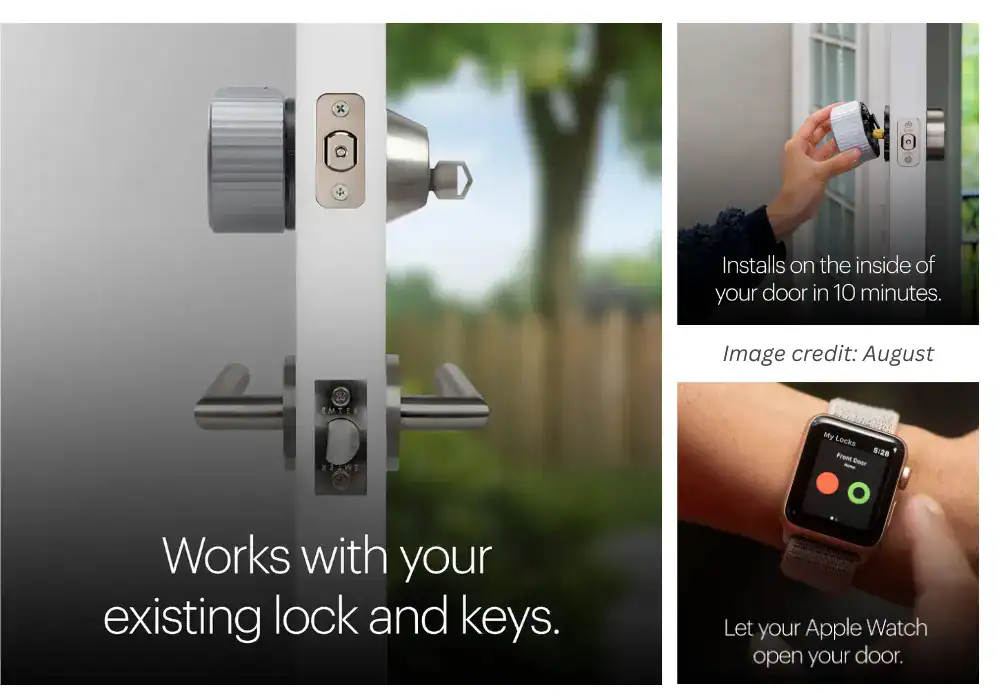
August Wi-Fi Smart Lock
Unmatched guest access features and keeps your existing deadbolt.
Pros:
- Unmatched Guest Access
- Keeps Your Existing Lock
- Incredibly Easy Installation
Cons:
- Bulky Interior Unit
- No Built-in Keypad/Fingerprint
- Auto-Unlock Can Be Finicky
I independently test and review smart home products. When you buy through my links, I may earn a commission — at no extra cost to you. As an Amazon Associate, I earn from qualifying purchases.
Why We Picked It
Unmatched guest access features and keeps your existing deadbolt.
Who It's For
Budget-conscious buyers who hate changing batteries.
Specs & Configuration
Smart Alerts – Customize notifications to know exactly what matters, when it matters.;
Bank-Grade Security – Features two-factor authentication plus AES 128-bit and TLS encryption.;
Doorbell Camera Integration – Works seamlessly with August Doorbell Cams for live view and remote access.;
Modern, Minimal Design – Fits any home style without changing your door’s exterior hardware.
Table Summary: Detailed summary of August Wi-Fi Smart Lock performance — convenience and compatibility balanced by battery and connectivity quirks.
6. Wyze Lock Bolt — My Pick for the Smart & Sensible Choice
After testing $300 “spaceships,” I asked a simpler question: what if you just want to open the door fast without overspending? Enter Wyze Lock Bolt—focus on the essentials: a snappy fingerprint and a backlit keypad. No Wi-Fi. No battery-draining integrations. And that’s okay.
In daily life, it covers 99% of what I do: fingerprint when my hands are full; a code for everyone else. Without Wi-Fi, battery life is excellent, and the “replace batteries again?” anxiety fades.
| 👍 Pros | 👎 Cons |
|---|---|
| Incredible value for core features. | No remote access. |
| Fast, reliable fingerprint reader. | No Alexa, Google, or HomeKit integrations. |
| Long battery life (no always-on Wi-Fi radio). |
Who it’s for
Anyone who wants to ditch keys with simplicity + value, no smart-home ecosystem required.
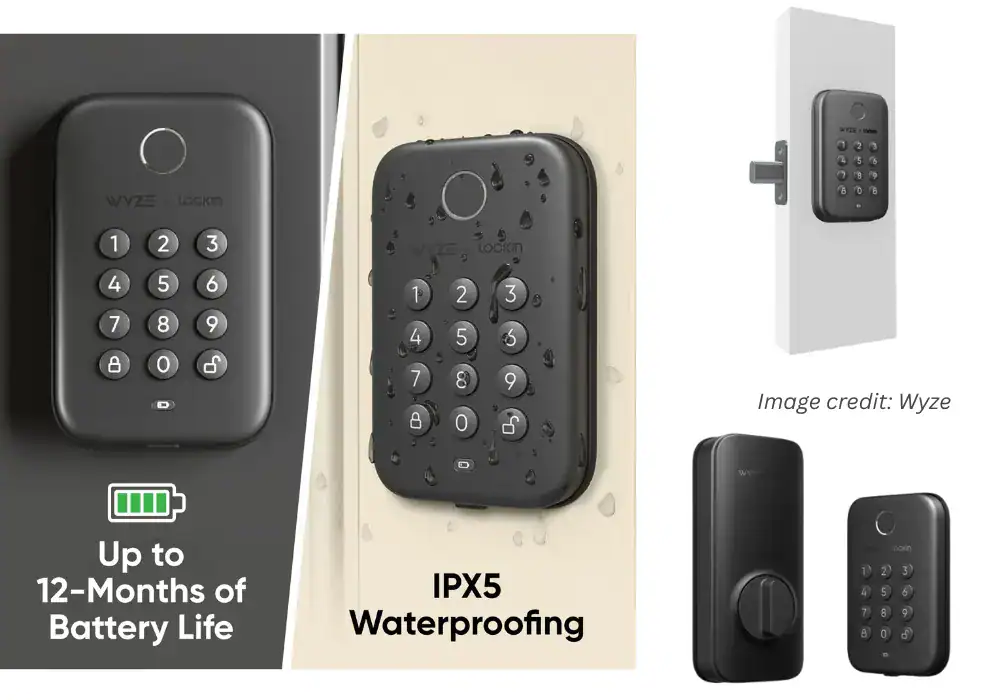
Wyze Lock Bolt
All the essential features (fingerprint, keypad) for a fraction of the price.
Pros:
- Incredible Value
- Excellent Battery Life
- Fast & Reliable Fingerprint Reader
Cons:
- No Wi-Fi or Remote Access
- No Smart Home Integration
I independently test and review smart home products. When you buy through my links, I may earn a commission — at no extra cost to you. As an Amazon Associate, I earn from qualifying purchases.
Why We Picked It
All the essential features (fingerprint, keypad) for a fraction of the price.
Who It's For
Budget-conscious buyers who hate changing batteries.
Specs & Configuration
Keypad &
Keyless Entry – Multiple ways to unlock: fingerprint, PIN, or phone.;
Auto-Lock Timer – Automatically secures the door after a set time.;
App Control (Wyze App) – Manage access, view history, and create schedules.;
Bluetooth Connectivity – Quick pairing and local control without Wi-Fi.;
Encrypted Data &
Security – Keeps access data private and secure.;
Easy Installation – Replaces existing deadbolt in about 20 minutes.
Table Summary: Overview of Wyze Lock Bolt advantages and limitations — budget-friendly performance with solid essentials but no Wi-Fi or app control.
7. Level Bolt — Best Invisible Smart Lock for Design Purists
Most smart locks draw attention. Level Bolt does the opposite. It installs inside your existing deadbolt, keeping your original door hardware intact. You still use your same key — but gain smart control through the app or automations.
It’s a rare blend of elegance and engineering: invisible, quiet, and built for those who value aesthetics as much as functionality.
❤️ What I love
- Completely hidden — preserves your door’s original look.
- Sleek, minimalist design that feels premium.
- Works seamlessly with Apple HomeKit and existing keys.
💔 What I don’t
- Touch-to-unlock can be inconsistent with iOS updates.
- Requires precise installation for smooth operation.
- No built-in keypad or fingerprint option.
😎 Who it’s for
Design-first homeowners, renters, and minimalists who want modern convenience without changing their home’s classic appearance.
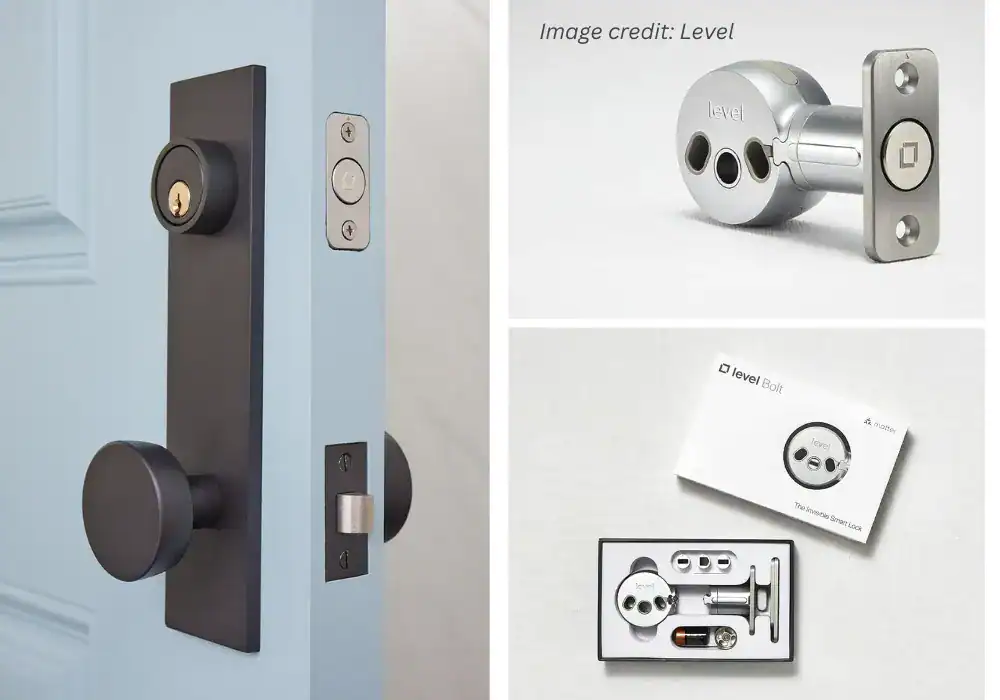
Level Bolt
All the smarts, completely hidden. Keep your home's original look.
Pros:
- A Completely Invisible Design
- Full Apple Home Key Support
- Protects Your Home’s Curb Appeal
- The Ultimate Minimalist Tech
Cons:
- Inconsistent “Touch to Unlock”
- Mechanical sensitivity and errors
- Intermittent HomeKit failures
I independently test and review smart home products. When you buy through my links, I may earn a commission — at no extra cost to you. As an Amazon Associate, I earn from qualifying purchases.
Why We Picked It
All the smarts, completely hidden. Keep your home's original look.
Who It's For
Design-conscious homeowners who value aesthetics.
Specs & Configuration
Invisible Installation – Retrofit design fits inside your existing deadbolt, keeping your door’s exterior unchanged.;
Easy Setup – Installs in minutes with just a screwdriver;
fits most standard doors (2-3/8"
or 2-3/4"
).;
Long Battery Life – Hidden CR2 battery delivers over a year of use.;
Auto-Lock &
Unlock – Uses geofencing to secure your door automatically when you arrive or leave.;
Secure Construction – 6-stage stainless steel gearbox meets top industry standards.;
Shared Digital Access – Grant and manage keys for family, guests, or service providers via the Level app.
Table Summary: Detailed summary of the Level Bolt — perfect for design-focused homeowners who value invisibility over keypad convenience.
My Takeaway
After months of testing, I stopped asking “Which is the best smart lock?” and started asking, “Which one feels right for me?”
- If you want a fortress: Schlage Encode Plus. – Best for Reliability (Apple HomeKey ready)
- If you face harsh weather: Ultraloq U-Bolt Pro – Best for All-Weather Durability.
- If you want reliable simplicity: Yale Assure 2 – Best for Ease of Use & Everyday Functionality.
- If you’re just starting out: Kwikset Halo Touch – Best for Beginners & Simple Setup.
- If you love design and Apple integration: Level Lock+ – Best Invisible Smart Lock for Design Purists.
Whatever you choose, make sure it gives you what these five finally gave me — peace of mind that your door will always open when it should, and stay shut when it matters most.
How to Choose the Right Smart Lock (Without Losing Your Mind)
The Hardest Part Isn’t Choosing the Lock — It’s Knowing Yourself
Before I even touched a smart lock, I had to ask myself a question that no review ever mentioned:
“What do I actually need this thing to do?”
Not what influencers said. Not what the ads promised. Just me — my habits, my routines, my house.
That’s where I (and most people) went wrong the first time.
We buy smart locks the same way we buy phones — chasing specs and fancy features instead of thinking about real life.
But this isn’t a phone.
It’s what stands between your family and the outside world.
And that changes everything.
Step 1 – Start with Your Real-Life Routine
When I began comparing what people called the best smart locks, I realized how disconnected most reviews were from reality.
They assumed everyone lived the same kind of life. Spoiler: we don’t.
If you’ve got kids running in and out all day, deliveries piling up, or guests visiting, your priorities are different from someone living alone in a quiet apartment.
Here’s how I learned to match lifestyle to lock:
| Lifestyle | What You’ll Appreciate Most |
|---|---|
| Busy household / kids | Keypad + physical backup key (Schlage Encode Plus, Yale Assure 2). |
| Apple ecosystem | Apple Home Key support (Schlage Encode Plus, Level Lock+). |
| Cold or humid weather | Weather-rated, reinforced designs like Ultraloq U-Bolt Pro. |
| Rental or Airbnb | Cloud-based access sharing and scheduled codes (Yale Assure 2). |
| Minimalist setup | Invisible, hardware-hidden designs such as Level Lock+. |
When you picture your worst morning — late for work, coffee spilling, phone at 1% — ask yourself:
“Will this lock still open easily?” That’s the one you want.
Step 2 – Understand the Tech (Without the Buzzwords)
Let’s cut through the marketing noise for a second. Here’s what the connection options actually mean:
- Wi-Fi: lets you lock/unlock from anywhere, but drains batteries faster.
- Bluetooth: local control, reliable, power-efficient.
- Zigbee / Z-Wave: great for advanced setups, but requires a hub.
- Thread / Matter: the future — fast, secure, and cross-compatible (official Matter overview).
When I learned about Matter, I finally understood why it’s such a big deal — Apple, Google, and Amazon actually agreed on something.
If you’re buying a lock in 2026, choosing one with Matter support is a smart move.
Step 3 – Look at the Hardware, Not Just the App
A great app means nothing if the bolt itself is weak.
When I dug deeper, I found a whole world of independent safety certifications most people never talk about.
That’s where I discovered ANSI/BHMA grades, the standard used by professional locksmiths (official BHMA reference).
Table — ANSI/BHMA Deadbolt Grades (stronger → basic)
| Grade | Plain-English Meaning | Recommended Use |
|---|---|---|
| Grade 1 | Commercial strength, high-abuse rated. | Front door — ideal. |
| Grade 2 | Strong residential, balanced durability. | Front door — most common choice. |
| Grade 3 | Basic residential hardware. | Interior or secondary doors. |
Here’s the shocker: some $300 “premium” smart locks don’t even hit Grade 2.
Meanwhile, the Schlage Encode Plus and Ultraloq U-Bolt Pro are both Grade 1 certified.
That’s when I realized: the real measure of safety isn’t how smart it is — it’s how strong it is.
If you want to understand how that plays out in daily use, I compared these certifications head-to-head in my durability and safety review.
Step 4 – Prioritize Redundancy, Not Perfection
Every smart lock fails eventually.
Batteries die, Wi-Fi drops, servers glitch.
The question isn’t if — it’s how gracefully it fails.
When I tested the Yale Assure 2, I deliberately turned off Wi-Fi and pulled the batteries to see what would happen.
Guess what? It still opened via keypad. And even if that failed, there’s a physical key backup.
That’s when I realized redundancy matters more than perfection.
My setup today has multiple access layers:
- Apple Home Key for daily use.
- Keypad when my phone dies.
- A physical key hidden in my car (some habits die hard).
If a lock doesn’t offer at least two backup options, it’s off my list.
Step 5 – Judge Brands by How They Handle Failure
You only really get to know a company when something goes wrong.
When my first smart lock bricked itself after a firmware update, I reached out to support — two days of silence, then a generic apology. That’s when I learned: support matters more than specs.
Here’s what I’ve experienced and confirmed through community feedback:
- Schlage: fast and solution-focused; they once replaced a unit I admitted was my fault.
- Yale: polite but slow; usually takes multiple follow-ups.
- Ultraloq: surprisingly responsive through Reddit’s smart lock community.
- Kwikset: solid by phone, average by email.
- Level: stylish hardware, sluggish replies — plenty of discussion on Apple’s Home forums.
If I had read those user experiences earlier, I would have avoided a lot of frustration.
Step 6 – Think Long-Term Security, Not Just Convenience
Now let’s talk about the part nobody likes to think about: hacking.
Are smart locks safe?
Yes — if you choose the right ones.
Brands like Schlage, Yale, and August use AES encryption, the same protocol used by banks and government systems (NIST’s documentation).
AES 128-bit or 256-bit encryption is practically unbreakable by brute force.
If a manufacturer doesn’t mention encryption or skips firmware updates, that’s a red flag.
One thing I appreciate about Schlage and Yale is transparency:
Schlage regularly posts firmware updates on their official blog, and Yale lists security patch notes on their support site.
It’s why the best smart locks now include automatic firmware updates and transparency reports from trusted brands.
If you want to see how encryption, updates, and safety testing compare across brands, I detailed that in my digital security overview.
Step 7 – Remember: Trust Beats Features
After testing more than a dozen of the best smart locks on the market, I realized I wasn’t searching for features anymore — I was searching for trust.
The best smart lock isn’t the one that impresses your guests — it’s the one you never have to think about. It’s the one that quietly protects your family and works flawlessly every single day.
That’s why my top picks remain:
- Schlage Encode Plus — for sheer dependability and seamless Apple Home Key integration.TOP PICK
Schlage Encode Plus
Pros:
- Apple Home Key is a Game-Changer
- Built Like a Tank
- Multiple Backup Plans
- Trusted, Household Name
Cons:
- Premium Price Tag
- Potential Weather Sensitivity
- Requires a Strong Wi-Fi Signal
Table Summary: Pros and cons overview of the Schlage Encode Plus — emphasizing its Apple Home Key integration and trusted build quality.
- Ultraloq U-Bolt Pro — for rugged reliability and weatherproof construction.
- Yale Assure 2 — for balanced, beginner-friendly simplicity.TOP PICK
Yale Assure Lock 2 Touch
Pros:
- Sleek Invisible Design
- Apple HomeKit Ready
- Strong Build Quality
- Auto-Lock & Geo-Fence
- Excellent Support
Cons:
- Unreliable Touch Unlock
- Installation Sensitivity
- High Price Point.
Table Summary: Pros and cons summary of the Yale Assure Lock 2 Touch — sleek design and Apple integration balanced by reliability issues.
- Level Bolt — for invisible design that blends into any door. Best Invisible Smart Lock
- August Wi-Fi Smart Lock — for quick retrofitting and smart home versatility.TOP PICK
August Wi-Fi Smart Lock
Pros:
- Unmatched Guest Access
- Keeps Your Existing Lock
- Incredibly Easy Installation
Cons:
- Bulky Interior Unit
- No Built-in Keypad/Fingerprint
- Auto-Unlock Can Be Finicky
Table Summary: Comparison of August Smart Lock strengths and weaknesses — seamless digital access versus bulky design and spotty auto-unlock.
- Kwikset Halo Touch — for reliable fingerprint access and easy setup. Best Fingerprint Lock for Simplicity
- Wyze Lock Bolt — for solid battery life at a budget-friendly price.TOP PICK
Wyze Lock Bolt
Pros:
- Incredible Value
- Excellent Battery Life
- Fast & Reliable Fingerprint Reader
Cons:
- No Wi-Fi or Remote Access
- No Smart Home Integration
Table Summary: Comparison of Wyze Lock Bolt strengths and weaknesses — a great low-cost smart lock missing only remote access and integrations.
Each of them earned my confidence not through flashy marketing, but through consistent, uneventful performance — which, in the world of security, is the highest compliment.
You can see how they stack up side-by-side in my full comparison guide below.
You can see how they stack up side-by-side in my top 3 smart lock reviews.
My Takeaway
If there’s one lesson this journey taught me, it’s that you can’t buy peace of mind — but you can install it.
Here’s the checklist I wish I’d had before buying my first lock:
✅ Know your real lifestyle and habits. ✅ Choose technology that fits you, not trends.
✅ Always check ANSI/BHMA certification.
✅ Demand at least two access methods.
✅ Prioritize brands with proven customer support.
✅ Confirm real encryption, not marketing buzzwords.
Follow those seven steps, and you’ll stop feeling like a beta tester of the best smart locks — and start feeling like a confident homeowner in 2026.
The Smart-Lock Anxiety Checklist: Straight Answers
Let’s name the fears out loud. Even after picking my top locks, a corner of my brain kept whispering “what if…?”. Here’s how I worked through each worry in real life—no hype, just what matters at your door.
Here’s how I worked through each worry in real life—no hype, just what matters at your door.
If you’re curious about setup or compatibility details, check our Smart Lock Installation Guide.
“Can someone hack my smart lock?”
Short answer: good brands make this very hard—most risks come from bad passwords and skipped updates.
What actually protects you
- Modern encryption (AES-128/256): the lock/app don’t send a plain “unlock” message; it’s encrypted end-to-end.
- Account hygiene > sci-fi hacks: use a unique, strong password and enable 2FA where available.
- Home network basics: WPA2/3 on your Wi-Fi, router firmware up to date.
- Update cadence: choose brands that publish firmware updates and security notes.
My takeaway: a quality smart lock raises security when you set it up like a security device (not like a toy).
“What if the battery dies or the power goes out?”
This was my biggest mental movie. In practice, locks layer multiple fallbacks.
How it works in real life
- Early warnings: weeks of low-battery alerts via app/LED/chimes. You have to ignore a lot to get stuck.
- Local still works: keypads and Bluetooth don’t need internet; a power outage ≠ a lockout.
- Mechanical key override: most picks keep the good old key as the final fail-safe.
- 9V emergency pads (some models): touch a 9V to the contacts, enter your code, you’re in.
My rule of thumb
- Swap batteries every 6–9 months (or before winter).
- Keep a spare key where you can reach it (mine lives on my car keyring).
“Is it as strong as a regular deadbolt?”
Don’t guess—check the grade. Independent ANSI/BHMA testing tells you how tough the hardware is.
| Grade | Meaning (Plain English) | Front Door? |
|---|---|---|
| 1 | Commercial strength, tested for high-abuse environments. | Yes — ideal. |
| 2 | Strong residential hardware with balanced durability. | Yes — most common choice. |
| 3 | Basic residential; designed for light use. | Better for interior or secondary doors. |
Many top models (e.g., my picks) are Grade 1. Translation: you’re not trading strength for smarts.
“Will it work in extreme weather?”
Two specs matter more than brand reputation: Operating Temperature and IP rating (dust/water sealing).
What to check
- Operating temp range: e.g., –22°F to 140°F means electronics are rated to function there.
- IP rating: IP65 = dust-tight + resists water jets (driving rain).
- Exposure: a covered porch forgives more; fully exposed doors benefit from higher IP and tighter gaskets.
- Cold = shorter battery life: physics, not failure—plan extra swaps in winter.
- Mechanical backup: if ice blocks a keypad, a key override ends the drama.
Quick selector
- Harsh climate or fully exposed door? Favor models with proven cold/humidity performance and higher IP.
- Mild climate/covered entry? You can prioritize features/price.
Bottom line:
Smart locks earn trust when they fail gracefully. If you pick a Grade-rated lock from a reputable brand, keep firmware updated, and give yourself two ways in (keypad + key, or watch + key), you’ll sleep better—and still walk in hands-free.
How to Choose the Perfect Smart Lock: A Buyer’s Guide
We handled the big fears. Now it’s decision time: which features actually fit your life? Here’s the guide I wish I had—plain talk, no jargon, so you feel like an expert in ~10 minutes.
Connectivity Deep Dive: Wi-Fi, Bluetooth, or Hub?
Understanding how Wi-Fi, Bluetooth, and hubs affect performance helps you decide which of the best smart locks truly fits your setup. Your connectivity choice drives two things: battery life and remote control. Think of three simple camps:
| Connectivity | How It Works | Biggest Pro | Biggest Con | Best For |
|---|---|---|---|---|
| Direct Wi-Fi | Lock connects straight to your router with no middle layer. | Full remote control and instant notifications anywhere. | High battery drain due to always-on radio. | Travelers, remote monitoring, frequent notifications. |
| Bluetooth Only | Your phone talks to the lock when you’re physically close. | Excellent battery life thanks to no Wi-Fi radio. | No remote control when you’re away. | Simple setups, long battery life, budget-friendly users. |
| Hub-Based (Z-Wave / Zigbee) | Lock → low-power mesh → hub → Wi-Fi → cloud/app. | Best balance: long battery life with full remote access. | Requires extra hardware and a more complex setup. | Smart-home users with hubs (SmartThings, Hubitat, Home Assistant). |
My takeaway: there’s no universal “best.”
- I chose Direct Wi-Fi for peace of mind while away.
- If battery life > everything, Bluetooth-only (e.g., Wyze Lock Bolt) is smart.
- If you already run SmartThings/Hubitat, Z-Wave/Zigbee is a sweet spot.
Access Methods: Which One Fits Your Routine?
Different days = different ways in. More options = fewer headaches.
| Category / Method | Description | Ideal For | Best Examples |
|---|---|---|---|
| Remote peace of mind (Wi-Fi) | Full remote control through app and real-time notifications. | Frequent travelers, remote home monitoring. | Schlage Encode Plus, August Wi-Fi Smart Lock |
| Battery first (Bluetooth) | Bluetooth keypad/fingerprint, no always-on Wi-Fi radio. | Users wanting maximum battery life. | Wyze Lock Bolt |
| Harsh weather (Rugged build) | Sealed design, water and dust resistant. | Humid, coastal or dusty climates. | Ultraloq U-Bolt Pro |
| Apple world (Home Key) | Tap-to-unlock using iPhone or Apple Watch. | Apple ecosystem households. | Schlage Encode Plus, Level Bolt |
| Hosting / guests (Airbnb) | Create temporary codes or remote access for visitors. | Airbnb hosts and frequent guest traffic. | August Wi-Fi Smart Lock |
| Aesthetics / minimalism | Discreet internal design hidden inside the door. | Design-focused homeowners. | Level Bolt |
| Keypad | Simple, app-free access with shareable codes. | Families, guests, busy households. | Yale Assure 2, Kwikset Halo Touch |
| Fingerprint | Instant unlock even with hands full. | Primary users wanting fastest entry. | Ultraloq U-Bolt Pro, Kwikset Halo Touch |
| Phone App | Status, logs, remote control, full management. | Everyone. | August Wi-Fi Smart Lock, Schlage Encode Plus |
| Proximity / Auto-Unlock | Geofencing unlocks the door when you arrive. | Tinkerers and automation fans. | Level Bolt |
| Physical Key | Guaranteed entry regardless of power or internet. | Anyone wanting maximum reliability. | Yale Assure 2, Level Bolt |
Schlage Encode Plus
Pros:
- Apple Home Key is a Game-Changer
- Built Like a Tank
- Multiple Backup Plans
- Trusted, Household Name
Cons:
- Premium Price Tag
- Potential Weather Sensitivity
- Requires a Strong Wi-Fi Signal
Table Summary: Pros and cons overview of the Schlage Encode Plus — emphasizing its Apple Home Key integration and trusted build quality.
Wyze Lock Bolt
Pros:
- Incredible Value
- Excellent Battery Life
- Fast & Reliable Fingerprint Reader
Cons:
- No Wi-Fi or Remote Access
- No Smart Home Integration
Table Summary: Comparison of Wyze Lock Bolt strengths and weaknesses — a great low-cost smart lock missing only remote access and integrations.
Yale Assure Lock 2 Touch
Pros:
- Sleek Invisible Design
- Apple HomeKit Ready
- Strong Build Quality
- Auto-Lock & Geo-Fence
- Excellent Support
Cons:
- Unreliable Touch Unlock
- Installation Sensitivity
- High Price Point.
Table Summary: Overview of Yale Assure 2 Touch advantages and drawbacks — stylish, feature-rich, but sensitive to installation and touch accuracy.
Smart-Home Ecosystems: Make It Play Nice
Ask these before you buy:
- Need voice control? If you already use Alexa/Google, locking the door from bed is addictive.
- Ring/doorbell cams? With compatible models, you can see a visitor and unlock in the same app during Live View.
- Apple user? Home Key = tap iPhone/Watch like Apple Pay (even works for a while after iPhone “dies”). If you’re Android-only, ignore it.
- How to confirm compatibility? Don’t trust titles—look for the logos on the official product page: Works with Alexa/Google/HomeKit/Ring/SmartThings. No logo, no promise.
Installation 101: Can You Really DIY?
Short answer: yes—if you can assemble IKEA, you can do this.
Pre-flight checks
Door
- Standard thickness? (Most locks fit 1-3/8″ to 2″.)
- Single-hole deadbolt? (Easiest swap. Mortise setups may need August-style retrofits or a pro.)
Tools
- Phillips screwdriver (90% dos installs).
- Smartphone (app setup).
- Tape measure (nice to have).
DIY vs Pro
- DIY if: standard deadbolt + standard door + screwdriver. Many apps bring step-by-step 3D animations. ~25 minutes.
- Call a pro if: mortise/older door, misalignment, or sticky current bolt (motors hate friction—fix alignment first).
Upside: doing it uma vez te dá noção de alinhamento e confiança para trocas futuras.
Quick Decision Map (use this to stop second-guessing)
-
I travel or want remote checks:
Choose a Wi-Fi smart lock for full control from anywhere.
Top picks: Schlage Encode Plus, August Wi-Fi Smart Lock. -
I want maximum battery and simplicity:
Go with a Bluetooth keypad/fingerprint Example: Wyze Lock Bolt. -
My door faces harsh weather:
Look for IP-rated locks with cold and humidity resistance.
Example: Ultraloq U-Bolt Pro. -
I’m deep in Apple’s ecosystem:
Get Home Key support for tap-to-unlock with iPhone or Apple Watch.
Best options: Schlage Encode Plus, Level Lock+. -
I rent or host guests often:
Choose a lock with guest access flows that are seamless and secure.
Recommendation: August Wi-Fi Smart Lock. -
I care about aesthetics:
Opt for minimal or invisible designs that blend with your door hardware.
Favorites: Level Bolt, Level Lock+.
From there, prioritize redundancy (two ways in) and you’re set.
My Final Verdict: Is a Smart Lock Worth It for You?
Short answer: yes—if you pick the right one for your life.
When I started, I was the skeptic: hackers, dead batteries, overpriced gadgets. After testing, reading real stories, and living with these locks, the truth felt simpler: a good smart lock doesn’t just replace a key—it removes a dozen tiny frictions you’ve stopped noticing.
What you actually gain
- Peace of mind at a distance: check/lock from miles away.
- Hands-free moments: no fumbling in the dark or with groceries.
- Cleaner access control: codes for guests, one-time keys, activity logs.
- Quiet magic: tap your watch/phone and walk in.
What you trade
- Batteries: swap them on a schedule (I do every 6–9 months).
- Fit to your setup: choose connectivity (Wi-Fi/Bluetooth/Hub) and ecosystem (Apple/Google/Alexa) that match your routine.
- A bit of homework: confirm ANSI/BHMA grade, weather specs, and backups.
Why the big fears shrink in real life
- Security: reputable brands use strong encryption (AES-128/256); the weak link is usually bad passwords or skipped updates.
- Lockouts: modern models layer keypad + key + 9V options; power/internet outages aren’t show-stoppers.
The Real FAQs
(What People Actually Ask Online about Best Smart Locks)
1. One of the biggest questions about the best smart locks is simple: are they actually safe?
That’s the first question everyone asks — and honestly, it was mine too.
When you replace a traditional deadbolt with a smart one, you’re not just upgrading hardware; you’re trusting software with your front door.
That thought alone made me uncomfortable at first.
The truth? Good smart locks are safe — if you pick the right brands and set them up properly.
Reputable names like Schlage, Yale, and Ultraloq use AES encryption — the same standard used by banks (see NIST’s explanation).
They also add two-factor authentication and encrypted Bluetooth sessions.
What makes people vulnerable isn’t hackers with laptops outside their homes — it’s ignoring firmware updates or using weak passwords.
If you want to go deeper into this, check my breakdown of lock security grades and real-world safety tests.
So yes, smart locks can be safe — if you treat them like a security device, not a gadget.
U-tec Ultraloq U-Bolt Pro
Built to withstand the elements with multiple backup entry methods
- Built for Bad Weather
- Extreme Redundancy (6-in-1)
- Fast Fingerprint Access
- Great Value for Features
- No Apple Home Key
- App Isn't as Polished
- Can Feel "Over-Engineered"
Table Summary: Pros and cons comparison of the Ultraloq U-Bolt Pro — emphasizing its rugged build, fingerprint speed, and redundancy features.
2. What Happens If the Battery Dies?
This one hit me personally.
I once came home after a long day, pressed the keypad… nothing.
No light, no sound — dead batteries.
I panicked for a minute until I learned the truth: every quality smart lock has a backup plan.
- Yale and Kwikset include a 9-volt port on the bottom — you can literally jump-start the lock with a battery.
- Schlage and Ultraloq come with a mechanical key override.
- Some locks even give weeks of warning through their apps before they die.
Now I just replace batteries every six months — and always keep a physical key in my car.
Kwikset Halo Touch Fingerprint
Installation is ridiculously simple.; Fingerprint recognition works fast and accurately.; Built-in Wi-Fi means no extra hub required.
- Reliable Fingerprint Sensor
- Auto-Lock Timer
- Intuitive App Setup
- No Keypad Needed
- Very Poor Battery Life
- Bad Engineering Design
- Weak Wi-Fi Integration
Table Summary: Detailed summary of Kwikset Halo Touch — simple smart lock for light use, limited by energy drain and inconsistent performance.
3. Can Smart Locks Be Hacked?
Technically yes — but not in the way people imagine.
Hollywood loves to show someone “hacking a lock” with a phone and a progress bar.
Reality is a lot less dramatic.
Modern locks use encrypted communication (AES-128 or 256 bit) and randomized Bluetooth keys. That means even if someone sniffs the signal, it’s useless without the matching token — think of it like trying to read a message that changes its alphabet every second.
The real risk is lazy security habits:
- Using the same password for your email and your lock app.
- Not updating firmware.
- Buying cheap, unknown brands with no track record.
If you’re curious how brands like Schlage and Yale handle digital defense, I analyzed that in my review on their firmware and safety approach.
Yale Assure Lock 2 Touch
Pros:
- Sleek Invisible Design
- Apple HomeKit Ready
- Strong Build Quality
- Auto-Lock & Geo-Fence
- Excellent Support
Cons:
- Unreliable Touch Unlock
- Installation Sensitivity
- High Price Point.
Table Summary: Overview of Yale Assure 2 Touch advantages and drawbacks — stylish, feature-rich, but sensitive to installation and touch accuracy.
4. How Long Do Smart Lock Batteries Really Last?
Marketing often says “up to a year,” but that’s in perfect conditions — no Wi-Fi, mild weather, and one unlock per day.
Here’s what I’ve actually seen:
| Connection Type | Average Battery Life |
|---|---|
| Wi-Fi Always On | 3–5 months |
| Bluetooth Only | 6–10 months |
| Thread / Matter | 9–12 months |
Cold climates can cut that by 30%. Auto-lock every 30 seconds will halve it. That’s why I switched to lithium batteries — they handle temperature swings better.
Schlage Encode Plus
Top-tier reliability with seamless Apple Home Key integration. Peace of Mind. It "just works” experience with the ultimate physical key backup.
- Apple Home Key is a Game-Changer
- Built Like a Tank
- Multiple Backup Plans
- Trusted, Household Name
- Premium Price Tag
- Potential Weather Sensitivity
- Requires a Strong Wi-Fi Signal
Table Summary: Detailed comparison of Schlage Encode Plus strengths and weaknesses — premium reliability with a few connectivity trade-offs.
5. Do I Need Wi-Fi for a Smart Lock to Work?
Nope.
All smart locks work locally via Bluetooth first — you don’t need Wi-Fi to unlock your door while you’re standing right in front of it. Wi-Fi just lets you check status or control the lock when you’re away.
If you travel often or run Airbnbs, Wi-Fi is a must.
Otherwise, stick with Bluetooth or Thread.
Speaking of Thread, it’s part of the new Matter standard, a protocol supported by Apple, Google, and Amazon to make smart devices work together (check the official CSA overview).
If you’re planning to build a connected home, Matter is worth watching.
I explain how it works in plain English in my setup and connectivity guide.
6. Are Smart Locks Hard to Install?
Not at all — if you can handle a screwdriver, you can install one.
Most models fit existing deadbolt holes and come with color-coded instructions. The average install takes 15–30 minutes.
My only advice? Test the lock before you mount it.
Many people skip that step and end up re-doing everything because the bolt was misaligned by a millimeter.
Also, avoid Wi-Fi setups on metal doors — they interfere with signal strength. If you have a steel door, use a Bluetooth model like the Ultraloq U-Bolt Pro.
7. What’s the Best Smart Lock for Families?
If you have kids, guests, or cleaning staff, go with a keypad model that lets you create temporary codes. The Yale Assure 2 and Schlage Encode Plus both let you set individual PINs for each person — and you can delete them instantly if someone leaves.
That’s the kind of convenience that actually adds security, not reduces it.
Final Thought
Most people come to smart locks for convenience.
But in the end, the best smart locks of 2026 aren’t just about technology — they’re about peace of mind, reliability, and trust.
If you’ve read this far, you probably already know the answer: the best smart locks are the one that fits your life, not just your door.
And if this guide helped you decide, take a look at my detailed comparisons and testing notes on each model and battery maintenance routines for long-term use.
Because peace of mind starts with one simple click — and sometimes, that click is digital.